Strict Negative Boundary
Scans project roots and halts immediately if React Native, Flutter (pubspec.yaml), or Web/Tailwind markers exist so cross-platform idioms never pollute native repos.
AI coding assistants default to web tropes on mobile: purple mesh gradients, card-in-card row wrapping, fake glass overlays, hardcoded hex literals, and happy-path-only views. Native Unslop turns your agent into a disciplined native mobile designer—locking onto your repo's real design tokens and enforcing Apple HIG & Material 3 craft.
Built exclusively for first-party iOS and Android SDK primitives—not web Tailwind wrappers or cross-platform compromises.
| Dimension | Generic AI / Web Prompts | Native Unslop |
|---|---|---|
| Target Platforms | Web, Tailwind CSS, React Native, Flutter | Pure native iOS (SwiftUI/UIKit) & Android (Compose/M3) |
| Token Discovery | Ad-hoc file browsing or invented hex literals | Bundled AST/regex scanner locks onto repo colors, fonts & spacing |
| Pre-Code Alignment | Rushes straight into UI code generation | Hard Gate: 4-point Design Intent Brief (+ 2-option greenfield fork) |
| Surface & Materials | Gratuitous neon gradients & fake specular strokes | Native Liquid Glass (.glassEffect(_:in:)), materials & M3 tonal roles |
| Contrast & Viewport | Low-contrast ghost text & bloated hero cards | WCAG AA (≥4.5:1), 30/60/10 viewport budget & peeking fold cutoffs |
| Lifecycle States | Happy-path data only | Enforces Loading, Empty, Error recovery & XXL font-scale reflow |
Every UI task passes through deterministic discovery, an upfront design brief gate, and a strict native verification checklist.
Scans project roots and halts immediately if React Native, Flutter (pubspec.yaml), or Web/Tailwind markers exist so cross-platform idioms never pollute native repos.
Runs the zero-dependency Python 3.8+ scanner to extract colors, typography, button styles, spacing, and architecture markers (@Observable, TCA, ViewModel/StateFlow), classifying the app across 5 native archetypes.
Forbids emitting UI code until stating the 4-point Design Intent Brief: Archetype & Tone, 60/30/10 Surface & Contrast, Layout Metaphor & Hero Budget, and Tactile/State plan.
Loads only the active platform's guidance—either iOS (SwiftUI/UIKit) or Android (Compose/M3), never both—keeping context lean and idioms pure.
Audits every generated or refactored screen for Card-in-Card resolution, spring physics, semantic haptics, 44pt/48dp hit targets, WCAG AA contrast, and all 4 native states.
Click any case study card to inspect the side-by-side transformation in full resolution across iOS SwiftUI and Android Jetpack Compose.
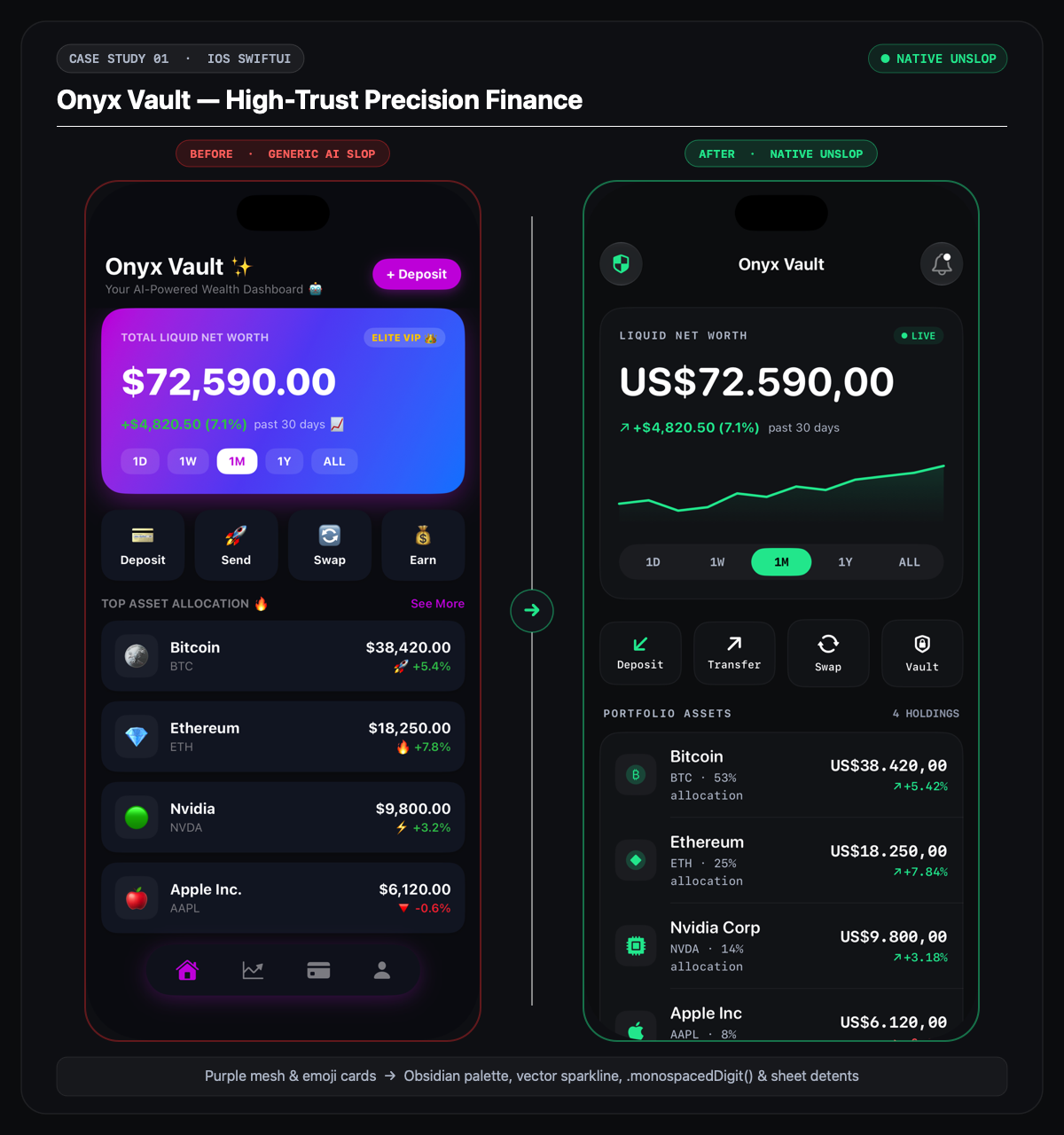
High-Trust Finance: obsidian & electric mint instrument, native Canvas sparkline, tabular numerals, and hairline-separated holding rows.
Editorial Commerce: hand-rendered chronograph canvas, high-contrast silver spec grid, tactile finish swatches, and translucent purchase dock.
Media & Immersive: 16:9 broadcast stage, spectrum visualizer & oscilloscope, pinned superchat banner, and tactile reaction dock.
Editorial Travel: stylized vector route canvas, overlapping traveler avatars, connected chronological stops, and ergonomic bottom CTA dock.
Dense Navigation: Material 3 Scaffold, native NavigationBar, segmented timeframe chips, and clean ListItem dividers.
Clean Utility: adaptive light/dark system canvas, .insetGrouped list hierarchy, Dynamic Type scaling, and native sheet detents.
Codified craft rules covering visual hierarchy, luminance integrity, physical gestures, and emotional reassurance.
.insetGrouped / ListItem with dividers..glassEffect(_:in:) and .ultraThinMaterial—never manual gradient sheens or fake specular borders..tertiary readable copy.1.586:1 cards, 16:9 media)..snappy / .smooth / Compose spring(...) motion, semantic .sensoryFeedback / LocalHapticFeedback, ≥44pt / ≥48dp targets.ContentUnavailableView), inline Error retry, and XXL Dynamic Type reflow (ViewThatFits).Once unlocked on Agensi, load the skill directly in your AI coding session inside any native iOS or Android repository.
SKILL.md, scripts/scan_ui_tokens.py, 5 reference guides, LICENSE.md, and 6 architectural case-study audits.Ask your agent to apply Native Unslop when building, refactoring, or reviewing mobile screens:
"Build a native SwiftUI transfer confirmation and portfolio summary screen using Native Unslop."

"Refactor OrderHistoryView.swift with Native Unslop to strip card-in-card nesting, enforce WCAG AA contrast, and add all 4 states."

"Audit our Jetpack Compose checkout screens for touch targets, window insets, and error recovery."No. Phase 0 enforces a strict negative boundary and stops immediately if React Native, Flutter (pubspec.yaml), or Web/Tailwind markers are detected, because cross-platform abstractions conflict with pure native iOS and Android primitives.
No. The bundled scan_ui_tokens.py script uses only the Python 3.8+ standard library, runs locally in milliseconds, and makes zero network requests.
Phase 2 enforces a 4-point Design Intent Brief hard gate so the agent commits to an intentional domain archetype, 60/30/10 color and contrast strategy, spatial layout metaphor, and state plan before emitting any UI code. On greenfield apps, it pauses with a 2-option style choice.
The token scanner detects existing Swift color/font extensions, .xcassets colorsets, ButtonStyles, ViewModifiers, or Compose Color.kt/Theme.kt/Dimens.kt tokens and puts the agent into locked_to_repo mode—banning raw hex or arbitrary point/dp literals.
Email phuc.do.vinh@gmail.com with your platform, target framework, and screen details.